
Dedicated IPs
General information
Dedicated IP addresses allow you to build your own reputation scores for your campaigns, totally independent from other clients who use our common pool of IPs. This strategy offers substantial deliverability benefits; on the other hand, it also requires some time to implement, since your new IPs must be “warmed up” before full-scale usage, in order to minimize the risks of blocking or ending up in spam. Mailbox providers are suspicious about large volumes of emails coming from new IPs or domains, so the number of messages sent from a new address should be increased gradually. This procedure is called “IP warmup”.
Initial setup
-
First of all, you will need to calculate the number of IPs you’ll need, based on your current infrastructure and sending volumes. Prepare a list of sending domains which you want to use with dedicated IPs. If you need to use separate IP addresses for different domains, please make sure that you’ve created special projects for each of these domains.
-
The required number of IPs for each domain or project is defined by the number of messages you’re intending to send. Currently we guarantee no less than 70 000 messages per hour from each fully warmed-up IP (the amount may actually vary from 70K to 100K, depending on the overall load and distribution of target domains). You can use this general formula for a quick estimate of the number of IPs you’ll need:
number_of_IPs = emails_per_day / 85000, rounded upwards
So, to send out, say, 10 million emails per month, or 333 000 messages per day you’ll need four dedicated IPs (333 000 / 85 000 = 3.9).
* Based on the contents of your campaigns, our specialists may advise you to order one or more extra IPs, in order to mitigate any delivery issues. Our anti-spam service is constantly keeping track of deliverability issues for all our users’ campaigns and will provide additional data on the number of IPs needed with regard to most recent anti-spam trends and any particulars of your individual case. -
Open the Settings – Dedicated IPs page in your account and click the plus icon.
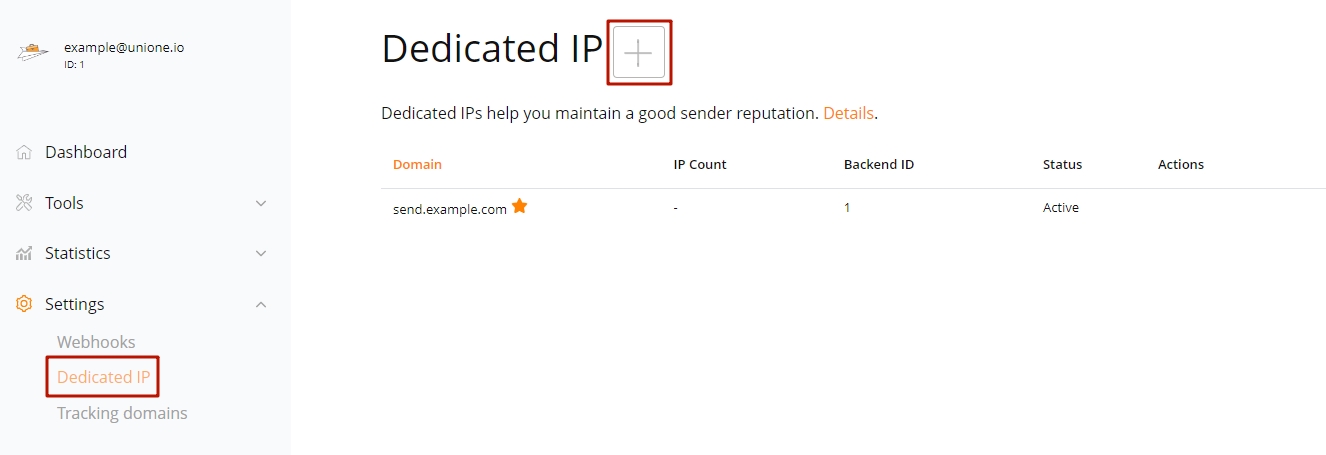
Enter a third level domain name which will serve as an IP pool name and tracking domain (for example.com, it may be something like send.example.org). Specify the number of IPs you need and click Save.
-
After saving, our account will be charged for the amount of $20 for each dedicated IP (a one-time setup fee) plus IP rent according to the formula: $40 divided by 30 and multiplied by the number of days left in the current accounting period. Afterwards, the monthly service fee for your dedicated IPs will be charged together with your regular payment.
(For custom contracts, the payment is carried out according to the contract’s terms.)
-
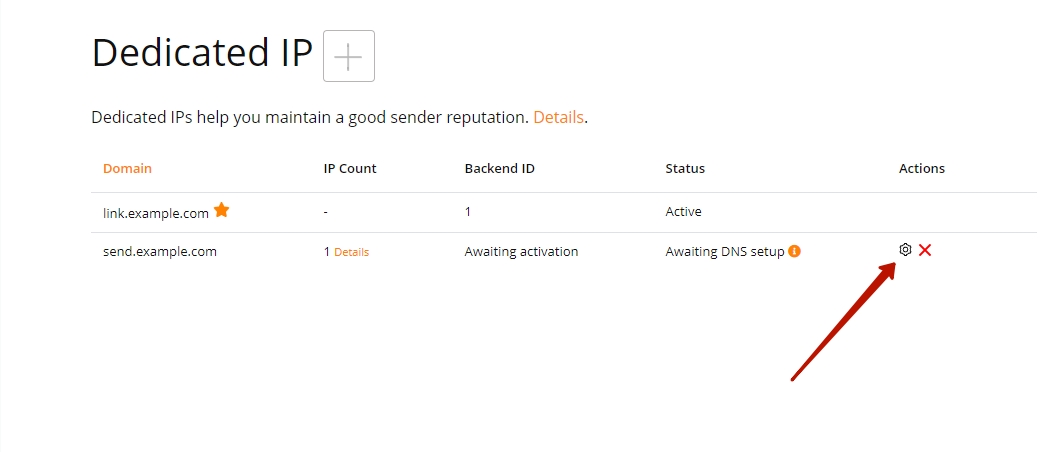
On the Settings – Dedicated IPs page, click the gear icon alongside your domain name. You’ll see a few DNS records that you will need to add in your domain registrar’s management console. Initially the domain status will be “Awaiting DNS setup”.
-
As soon as the new records are updated in our system (it usually takes up to two hours, depending on your provider’s settings), the domain status will change to “Domain setup in progress”.
-
During the next 48 hours our specialists will perform the necessary setup, and the status will change to “Active”. Now your domain is ready for use, you may activate it and designate it as a default domain. If you’ve set up more than one domain and need to specify the one to be used while sending a particular letter, specify the corresponding custom_backend_id value while calling email/send. The values can be found on the same page, in the Backend ID column.
- If they do not show up after two days, please ask our support to check the issue. Our specialists will find out what has gone wrong and offer possible remedies. If any additional corrections for your DNS records are needed, we return to step 5.
- As soon as the DNS records are in effect, the warm-up procedure is initiated automatically. It usually takes 40 days, during which the system will automatically adjust the mailing volumes on a per-hour and per-domain basis. This minimizes the risks of spam blocking, allowing you to gradually build up a solid reputation for an IP.
-
Consistency, gradualness and regularity are vital for a proper warmup, so the mailings need to be done in smaller chunks. As a result, large campaigns may be partially delayed. Generally, there are two ways to deal with such tasks:
- The default “hard limit” scheme suggests that our system allocates as many emails as can be sent from new IPs during a 10-hour period. Any daily emails over this quota will be sent via the common IP address pool. This sequence guarantees proper IP warmup and queue management. However, the maximum queueing delay with this scheme will be 10 hours.
- The “soft limit” scheme, available upon request, requires instant redistribution of emails between dedicated and common IPs. With smaller email quantities or irregular flows, dedicated IPs may not be properly warmed up, as the common IP pool provides substantially higher throughput. This is why we recommend this scheme only if you can provide a steady flow of emails with regard to the hourly limits table, shown below.
During the IP warmup period, it is highly recommended that you send the required number of emails each day.
-
IP warmup is carried out automatically following a proven procedure. Our anti-spam team members will monitor delivery rates for every IP and advise you on quota adjustments to get the best results.
Warmup limits table
The approximate hourly limits for Gmail and Yahoo Mail are shown in the table below for reference. The exact quotas, aimed at minimizing the possibility of spam blocks, vary depending on mailbox provider, the day of the warm up sequence and many other factors.
Day of warmup Google, emails per hour Yahoo, emails per hour 1 48 48 2 57 57 8 225 225 15 1100 1000 23 12000 2500 28 47000 5000 35 unlimited 10000 40 unlimited unlimited -
To learn what your current exact quotas are, feel free to contact our tech support anytime. As soon as the warmup procedure is over (typically in 40 days), all limits are removed, and your IPs will be used for all of your mailings.
We wish you all the best using UniOne, and may all your emails reach the designated inboxes!
